
Site visit report template
Updated September 3, 2026

Fill this in on your iPhone, on site, with Sitewise.
Get the appA site visit report gets read once, fast, on a phone, by someone who was not there. Every choice in the template below exists to survive that read.
What follows is a structure you can copy into a document today: the header fields, the observation format, a filled-in example from a fictional job, and the parts most templates carry that you can delete without anyone noticing.
Four header fields decide whether the report is usable later
The header is what you rush through on site and what matters most when someone pulls the report out of an email eighteen months later, in a meeting about who knew what and when. Keep it to four lines.
| Field | What goes in it | Example |
|---|---|---|
| Report date | The date of the visit, not the date you wrote it up | Monday, June 8, 2026 |
| Project | Name, plus building or phase if the site has more than one | Maple Grove Office Park, Bldg A |
| Project address | Street address of the site itself, not your office | 2418 Maple Grove Way |
| Inspector | Who walked it, and for which firm | M. Duarte, Bayfront Engineering |
Two optional lines earn their space some of the time. Weather belongs in a roofing or sitework report and nowhere else. Time on site (arrived 9:14, left 11:20) belongs in any report you might bill against, and it settles a surprising number of arguments about how thorough the walk was.
Everything else people put up top, a scope statement, a distribution list, a disclaimer about the limits of a visual inspection, can move to the last page. Nobody reads past the first finding to reach the findings.
Number every observation, and never renumber
Give each observation a number in capture order, #1 through #40, and treat those numbers as permanent. The number is the handle everyone else uses. The mechanical sub replies about #17. The RFI cites #17. Your follow-up walk two weeks later closes #17. Re-sorting by severity and renumbering breaks every one of those references.
Capture order also traces your route. A reader walks the building the way you did, main service room, then floor 2, then the roof, and the report gains a shape without you writing a word of narrative.
| Field | What goes in it |
|---|---|
| Number | Sequential, capture order, permanent |
| Photo | One frame, wide enough to place it, close enough to see the issue |
| Location | Room number, grid line, level, or elevation. Not "second floor" |
| Observation | What is there, in measurements |
| Action | Who does what, and by when if you know |
The action line is the one people skip. A report full of observations and no actions reads as a complaint. The same report with "mechanical sub to confirm reroute drawings by end of week" on three of the forty items reads as a work plan.
A measurement in the caption is what closes the issue
Nobody reads a site visit report for the photos. They read the caption and glance at the photo to confirm it. The caption carries the weight, and what separates a finding somebody acts on from one somebody argues with is usually a measurement.
"Clearance appears tight at the rear cell" is not a finding. "Rear-cell working depth at the north switchgear is 28 inches against the structural beam; spec calls for 30" is a finding, and it is one the electrical sub can act on without a call.
Write the caption as if the person reading it will never speak to you. That is close to true.
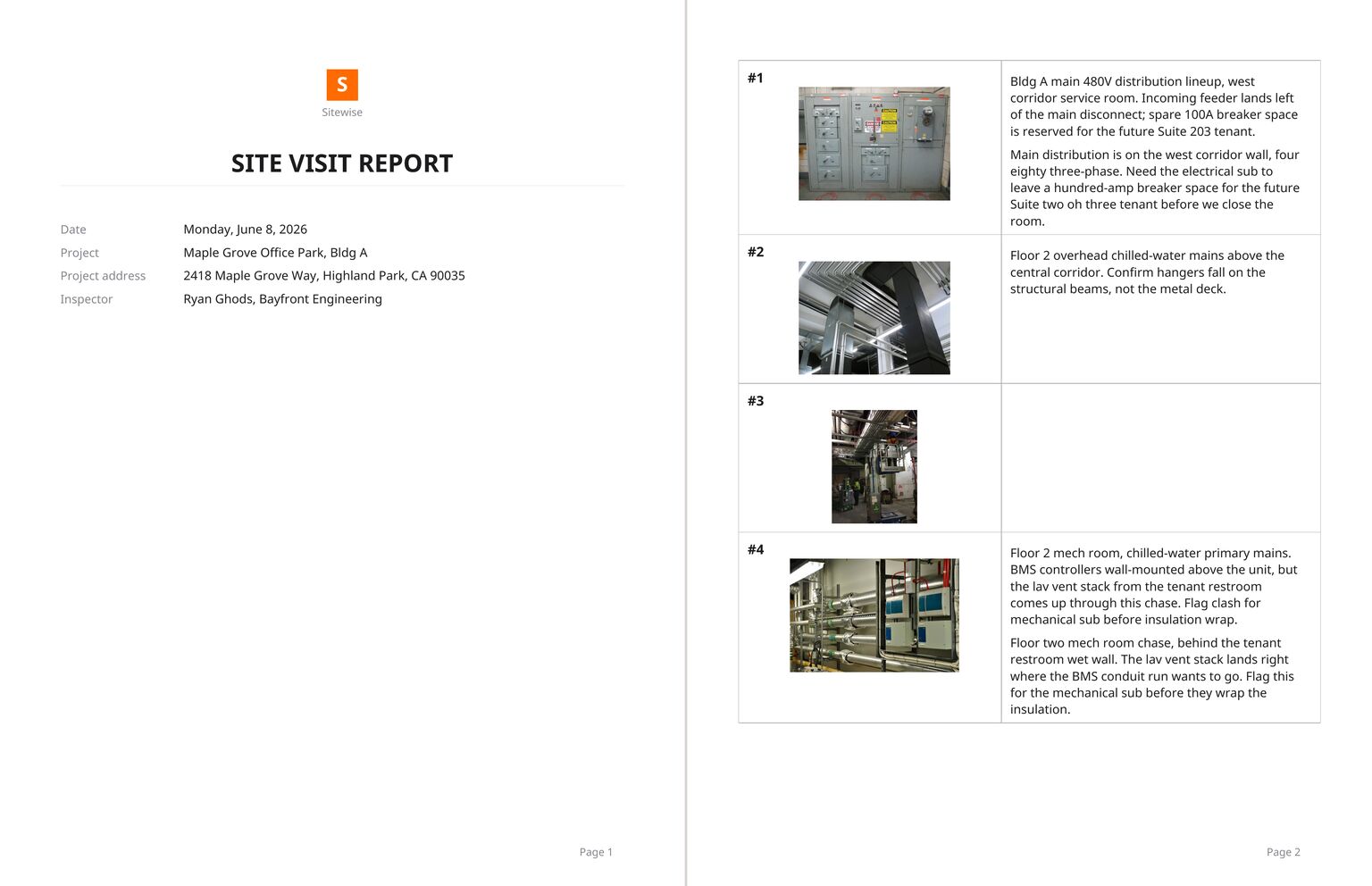
A filled example, from a project that does not exist
Header:
Report date: Monday, June 8, 2026 Project: Maple Grove Office Park, Bldg A Project address: 2418 Maple Grove Way Inspector: M. Duarte, Bayfront Engineering On site: 9:14 to 11:20
Observations:
| # | Location | Observation | Action |
|---|---|---|---|
| 1 | West corridor service room, Level 1 | Bldg A main 480V distribution lineup. Incoming feeder lands left of the main disconnect. Spare 100A breaker space reserved for the future Suite 203 tenant. | None. Record only. |
| 2 | Central corridor, Level 2 | Overhead chilled-water mains run above the corridor ceiling grid. Hangers appear to land on the metal deck in two locations. | Mechanical sub to confirm hangers fall on structural beams before the grid closes. |
| 4 | Mech room 204 | Lav vent stack from the tenant restroom rises through the same chase as the BMS conduit run. Clash at the controller elevation. | Flag to mechanical sub before insulation wrap. |
| 6 | North service room | Low-voltage switchgear section. Rear-cell working depth measures 28 inches against the structural beam. Spec calls for 30. | Verify against structural drawings; reroute or relocate before energizing. |
Notes:
Site access: owner provided badge access through the loading dock. Badge expires before next Tuesday's follow-up walk. Open items: three coordination items flagged today. Recommend a walk with the plumbing, mechanical and electrical subs before the ceiling grid closes.
Four observations out of six, because #3 and #5 were context shots with no finding attached. Leaving them in the report with a blank caption is fine. Deleting them costs you the ability to prove what the room looked like that morning.
An executive summary costs more than it saves
An executive summary that repeats the observations in paragraph form. Readers skip it, and when the summary and the findings disagree, the summary is what gets quoted back at you.
A photo appendix at the back with every frame from the walk. If a photo matters, it has a number and a caption in the body. If it does not, it stays in the project.
Severity color codes you never defined. Red, amber and green mean whatever the reader assumes they mean, and half the time that is not what you meant.
"No issues noted" lines for rooms you walked through without stopping. The time on site already says you were there.
Open the sample PDF and DOCX before you build your own
Two files, same content, both produced by Sitewise from a sample project: the PDF and the DOCX. Open the DOCX if you want to strip our formatting and keep the structure.
Sitewise builds that structure out of the walk itself, on iPhone and iPad: photograph what you find, dictate a note (transcribed on the phone itself), sketch on the photo to point at the defect, type an observation, and every capture carries its timestamp and, when location is on, a GPS pin. It works offline, because a basement service room rarely has signal, then exports the whole visit as PDF or DOCX. It does not schedule, budget, draft, or collect signatures.
For the writing itself, the wording of a caption, when to hedge and when not to, the companion guide on how to write a site visit report goes line by line.
The template is only half the work. The report that gets forwarded is the one where observation #6 says "28 inches, spec calls for 30" instead of "clearance appears tight", and that sentence gets written on site, standing in front of the switchgear, or it does not get written at all.
Questions people ask
- What should a site visit report include?
- Four header fields (visit date, project and building, site address, who walked it), then numbered observations in the order you captured them, each with a photo, a location, what you saw and what you want done. Anything that changes the schedule or the money goes in a short notes block at the end. Everything else is optional.
- How long should a site visit report be?
- As long as the walk was. A 40-photo walk through a mechanical fit-out is a 40-observation report and nobody will complain. What makes a report feel long is padding: a summary that repeats the observations, a photo appendix nobody opens, two pages of firm boilerplate before the first finding.
- Is a site visit report the same as a daily construction report?
- No. A site visit report covers one visit by one person and answers what they saw. A daily construction report covers a whole working day on site and answers who was there, what got built, what the weather did and what stopped work. A superintendent files a daily log every day; a consultant files a visit report when they visit.
Related guides
- How to write a site visit report
Write the site visit report on site, not at 9pm. How to capture in walk order, caption in measurements, cut the photo set and send before you leave.
- How architects write a site observation report
What belongs in an architect site observation report, how to number and photograph observations, and how to send the PDF before you leave the site.
Write this report on site, not in the truck.
Sitewise turns photos, voice notes, sketches, and typed observations into a PDF or DOCX before you leave. iPhone and iPad, iOS 26 or later.
Get the app