
Timestamped photos in construction disputes: when and where beat what
Updated November 5, 2026
Fill this in on your iPhone, on site, with Sitewise.
Get the appWhen a photo comes up in a construction dispute, the argument is usually about when it was taken and where. Those two facts come from the timestamp and the location the device attached to the photo, and the picture itself cannot supply them.
Most disputes are about timing, not about what happened
Look at what the two sides in a typical claim actually disagree on. Both usually accept that the crack exists. The question is whether it was there before the follow-on trade started. Whether the membrane was lapped before the screed went down or after someone complained. Whether the damage to the stair nosing happened during the fit-out or after handover.
A photo of the cracked nosing answers none of that. It shows a cracked nosing. What makes it useful is a time that sits on one side of a date everyone agrees on: the handover, the day the follow-on trade arrived, the date of an instruction.
So on site, the aim is photos whose time and place nobody has a reason to question.
A date you type is a date someone can question
There are two ways a date ends up attached to a photo. The device records it at the moment the shutter fires, or a person writes it in later.
The second is where records fall apart. Someone files twenty photos into a folder called "Week 14" on a Friday afternoon, and in month eight nobody can say which of them were taken on Monday and which on Thursday. Or the report says "photos taken 3 March" when half of them came from the visit on the 1st.
A capture time recorded by the device is a better starting point because nobody had a chance to choose it. It is not proof on its own. The phone's clock can be set by hand, and the Photos app on an iPhone lets anyone adjust the date and time on a picture. A capture time is believable when the rest of the record agrees with it, and the rest of the record is something you control.
GPS places the site, and the note places the room
A GPS pin on a photo will not tell anyone which bathroom it was. Indoors, a phone's position can drift by more than the width of a room, and in a basement or a concrete core it may not get a fix at all.
What it does show is that the photo was taken at this site and not at the job across town with the same tile and the same contractor. For a builder with three similar projects running, that alone settles more arguments than you would expect.
Write the precise location in the note: the room number, the gridline, the elevation, the distance from a fixed point. Let the GPS pin confirm the address.
Protect the original file
Most of the metadata that makes a photo useful lives in the file, and it is easy to lose without noticing.
- A screenshot of a photo has the time you took the screenshot, and none of the original's location.
- Many messaging apps compress photos and strip some or all of the metadata on the way through.
- Cropping, marking up or exporting a photo can write a new file with new dates.
- Moving photos between cloud services sometimes resets the file date to the day of the move.
None of this stops you marking up a photo for the report. A circle and an arrow on the image is what makes a busy wall readable. Just keep the unmarked original as well, with its capture time and location intact, and know where it is.
If someone asks, months later, for the original of photo 14, you want to be able to send it that afternoon.
Make the photo agree with everything else
A timestamp is believed when it matches the rest of the record. A photo stamped 10:42 on 6 March is strong when the site diary for 6 March says you were on site from 9:30 to 12:00, the visit report went out at 13:15 the same day, and the note on the photo was written at 10:43.
It is weak when the diary has no entry for that day, the report went out a fortnight later, and the description reads like it was written from memory.
That is the practical argument for writing the note at the photo rather than later. The photo, the description and the time travel together, so nobody has to reconstruct which caption belongs to which picture. It is also the argument for keeping a site diary even on visits where nothing much happens: it is the second record a timestamp gets checked against.
Photograph the thing before it is covered
The most valuable photos in a dispute are usually the ones nobody thought were important at the time. The fixings before the plasterboard went up. The membrane laps before the screed. The pipe insulation before the ceiling closed. Once the work is covered, the photo is the only view anyone will get without opening it up again.
These are timing photos by nature. Their whole value is that they show the condition at a moment that has passed. Take one wide frame that places the work in the room, one close frame of the detail, and one with a tape or a known object for scale, and make sure all three carry the device's time.
If you are told work is being covered on a particular day, write down who told you and when, and take the photos before that day rather than on it.
Send it the same day
A report that leaves site the same day as the photos fixes the date in a second place: the sent email, which sits in someone else's inbox where you cannot change it. That is often worth more than anything inside the photo file.
It also reaches people while the condition is still there. If the contractor disagrees with an observation sent at 13:15, they can walk over and look that afternoon. Sent three weeks later, the same observation is something they have to take your word on, and the defect may already have been patched.
How a contract treats your photos, what notice it requires and how a tribunal weighs a record are questions for the contract and, where it matters, for a lawyer. What you can control is whether the record is consistent, complete and sent on time.
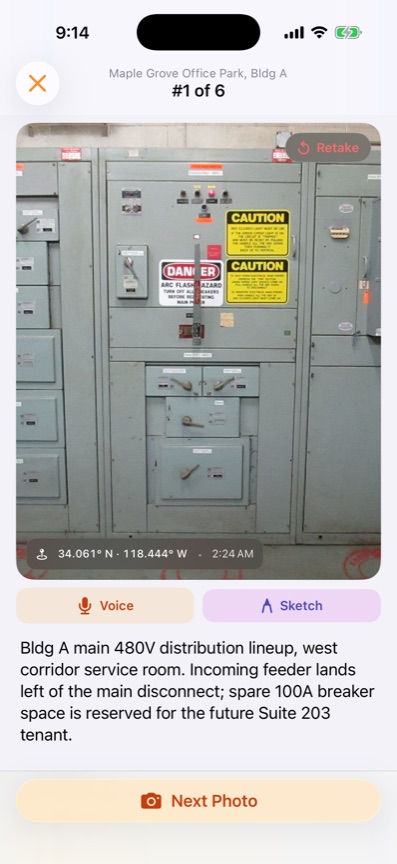
Sitewise is built for the capture half of this, on iPhone and iPad. Each photo, voice note, sketch and typed note gets a timestamp when it is taken and, with location on, a GPS pin, and the note sits on the photo it describes. It works with no signal and syncs when the device is back online, and the project exports as a PDF or DOCX you can email before you leave. It does not manage claims, track variations or costs, or collect signatures, and it is not a legal record system, so if your contract needs any of that you will need something else alongside it.
For how to describe and number each defect in that record, see how to document construction defects. For shooting and filing the photos so they still make sense in three years, see construction photo documentation.
Questions people ask
- Are timestamped photos good evidence in a construction dispute?
- They are useful evidence of when and where something was seen, as long as the time was recorded by the device at capture and the original file still exists. Whether a particular photo is accepted, and how much weight it carries, is for the contract, the tribunal or the court to decide. Treat the photo as one part of a record that also includes your notes, your diary and the date you sent the report.
- Can the date on a phone photo be changed?
- Yes. The Photos app on an iPhone lets you adjust the date and time of a picture, and other apps can rewrite the metadata too. That is why the original file, a report sent the same day and a second record such as a site diary entry matter: they are much harder to change after the fact than one field in one file.
- Do messaging apps remove the timestamp from photos?
- Many of them compress photos and strip some or all of the metadata on the way through, and a screenshot of a photo carries none of the original's. Send the record as a report or the original file, and keep the original on the device or in your own storage.
- Does a GPS location on a photo prove which room it was taken in?
- No. Phone GPS places a photo at an address or a part of a large site, and indoors it can be off by more than a room. Write the room, the gridline or the elevation in the note as well, and use the GPS pin to show the photo came from this job and not another one.
Related guides
- How to document construction defects so the record holds up
Document a construction defect by capturing the photo, the note, the location and the date in one step on site, so nothing has to be matched up later.
- Construction photo documentation that still makes sense in three years
How contractors shoot, caption and file job site photos so they hold up later: wide-medium-tight, pre-cover shots, scale objects and same-day captions.
Write this report on site, not in the truck.
Sitewise turns photos, voice notes, sketches, and typed observations into a PDF or DOCX before you leave. iPhone and iPad, iOS 26 or later.
Get the app