
Construction photo documentation that still makes sense in three years
Updated September 3, 2026

Fill this in on your iPhone, on site, with Sitewise.
Get the appA construction photo is worth nothing later unless somebody can say where it was taken, when, and what it is showing. The camera in your pocket already handles the when and, with location on, most of the where. The what is the part that gets skipped, and it is the part that decides whether a folder of 400 photos is a record or a pile.
The habits below cost a few extra seconds per photo on site and save the time you would otherwise spend at a laptop guessing at your own pictures.
Shoot in threes: wide, medium, tight
One photo of a defect proves the defect exists. It does not prove where it is.
Take a wide shot from the doorway that establishes the room. Take a medium shot from six to ten feet that puts the condition in context against something identifiable: a window, a column, a door frame, a grid line marked on the slab. Then take the tight shot of the condition itself.
Three photos, and any reader can walk to the exact spot. Skip the first two and you will be the only person who can, and only for about a week.
Caption at the moment of the shot or not at all
Memory for photographs decays fast, and you will not notice it happening. You do not forget that you photographed something. You forget which of the four similar pipe penetrations you photographed, and you confidently caption the wrong one.
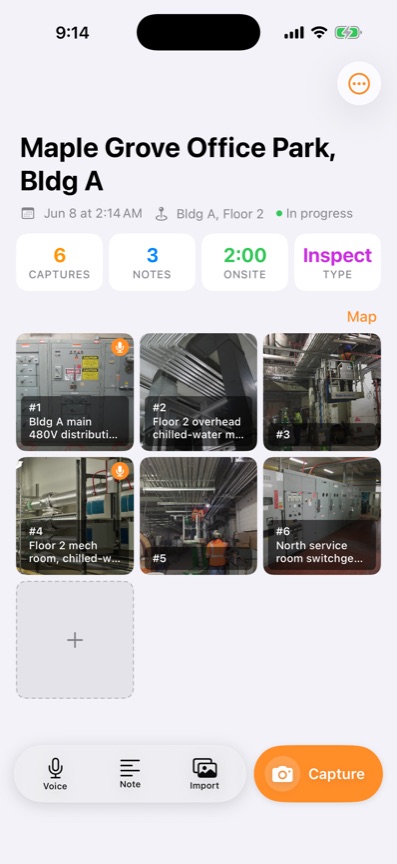
Say the caption out loud while you are looking at the thing. "Floor two mech room, chilled water primary mains, lav vent stack crossing the BMS conduit run, flag for the mechanical sub before insulation wrap" takes seconds to say and a good deal longer to type with gloves on.
Sitewise attaches that as a voice note transcribed on the iPhone itself, so the transcript is already sitting under the photo when you get back to the truck. Any tool that lets you talk instead of type will do. The point is that the caption and the photo are created in the same moment, on site, by the person who was looking at it.
Photograph what is about to disappear
Everything that gets covered gets photographed before it gets covered, without exception. There is no second chance and the list is short enough to memorise.
Rough plumbing and electrical before drywall. Insulation and vapor barrier before board. Waterproofing and flashing before cladding. Reinforcing steel, dowels and embeds before the pour. Underground services before backfill, with a tape or a story pole in shot for depth. Fire stopping at penetrations before the ceiling grid closes.
Shoot each of those wide enough to locate and tight enough to read. A photo of rebar that does not show a wall, a form edge or a grid marker is a photo of rebar, and rebar looks the same everywhere.
Put something in the frame that has a known size
Scale is the cheapest thing you can add and the first thing missing when a photo becomes an argument. A tape measure pulled out along a crack. A four foot level across a floor deviation. A pen, a coin, a folded rule, a hand. Anything a reader can calibrate against.
Better still, put a number in the caption. "Gap measures 7/8 inch at the widest point" beats a photo where the reader has to guess, and it takes one spoken sentence. Do both when the item is likely to cost someone money.
Number in capture order and keep the numbers
Photos numbered in capture order, in one continuous sequence per project, cost nothing on site and save every downstream conversation. Photo 23 stays photo 23 in the report, in the email, and in the reply three weeks later.
Filenames from the camera roll are useless for this and renaming 60 files by hand is worse. The practical answer is to capture inside whatever produces the report, so the numbering already exists when you export. That is the difference between a report you assemble and a report you send.
Keep the location in the caption in a consistent order too: building, floor, room or grid, then the condition. Sorting and searching a year of captions works if the format is stable and falls apart if it is not.
Trim before you send, keep everything after
Not every photo belongs in the client's document. Twelve well chosen photos that tell the story of the visit read better than sixty that include three exposures of the same panel and a shot of your boot.
Choose the set that goes in the report, leave the rest in the project. The unused shots stay filed and dated against the same visit, which is exactly what you want when someone asks about the corner of the room nobody was thinking about at the time.
Send it the same day, from the site if you can
A report that goes out the afternoon of the visit is more accurate than one that goes out on Thursday, and it lands while the people who can act on it are still on the job. Same-day delivery also fixes the compounding problem: two visits behind turns into four, and the fourth report gets written from photos alone.
If you can produce the document on the phone, do. Sitewise exports a project as a formatted PDF or DOCX with the photos, captions, sketches and transcripts in capture order, and emails it before you leave. It works with no signal and syncs later, which matters in a basement or a plant room. It does not do scheduling, budgeting, CAD or e-signature, it is iPhone and iPad only, and it is free during the launch period. Other tools cover the same ground differently, and the trade-offs are laid out in the best site inspection apps for iPhone.
Most of a day's captures never reach the report
Say a four hour walk through a two story fit-out leaves you with seventy captures. Most are conditions worth a caption. A dozen are pre-cover shots that exist only because the ceiling closes next week, and the rest are context and establishing shots.
Twenty of them go in the report, numbered, each with a location, a description in plain language, and a measurement wherever a number is meaningful. The other fifty stay in the project with their timestamps and pins, and the site visit report template shows the shape the finished document takes. None of this needs a better camera. All of it is decided in the moment after each shutter press, while you are still standing in front of the thing.
Questions people ask
- How many photos should I take on a typical site visit?
- Enough that every condition you would mention in writing has a picture, and every picture you keep has a reason to exist. On a small residential job that might be fifteen. On a floor of a commercial fit-out it can pass a hundred without any of them being wasted. Count captioned photos rather than total photos, because an uncaptioned photo is not documentation.
- Should I keep photos that never make it into a report?
- Yes, in the project, out of the report. The shot you did not send is the one you want when a question comes up about a corner of the room nobody was looking at. Keep the full set filed by project and date, and choose a smaller set for what goes to the client.
- Do phone timestamps and GPS tags hold up if there is a dispute?
- They help, because they are recorded automatically at the moment of capture rather than typed in afterwards, and they are far better than nothing. How much weight any record carries in a specific dispute depends on your contract and on local rules of evidence, so ask your own counsel rather than relying on a phone setting.
Related guides
- Site visit report template
A site visit report template with the header fields, numbered observations and caption pattern that hold up in a dispute, plus a filled example and sample PDF.
- The best site inspection apps for iPhone, checked in September 2026
Eight iPhone apps for site inspections and field reports, with what each one captures, what it exports and what it costs, checked against their own listings.
Write this report on site, not in the truck.
Sitewise turns photos, voice notes, sketches, and typed observations into a PDF or DOCX before you leave. iPhone and iPad, iOS 26 or later.
Get the app